
Bringing IndicTrans2 to the Browser: Custom ONNX Exports and WebGPU Optimizations
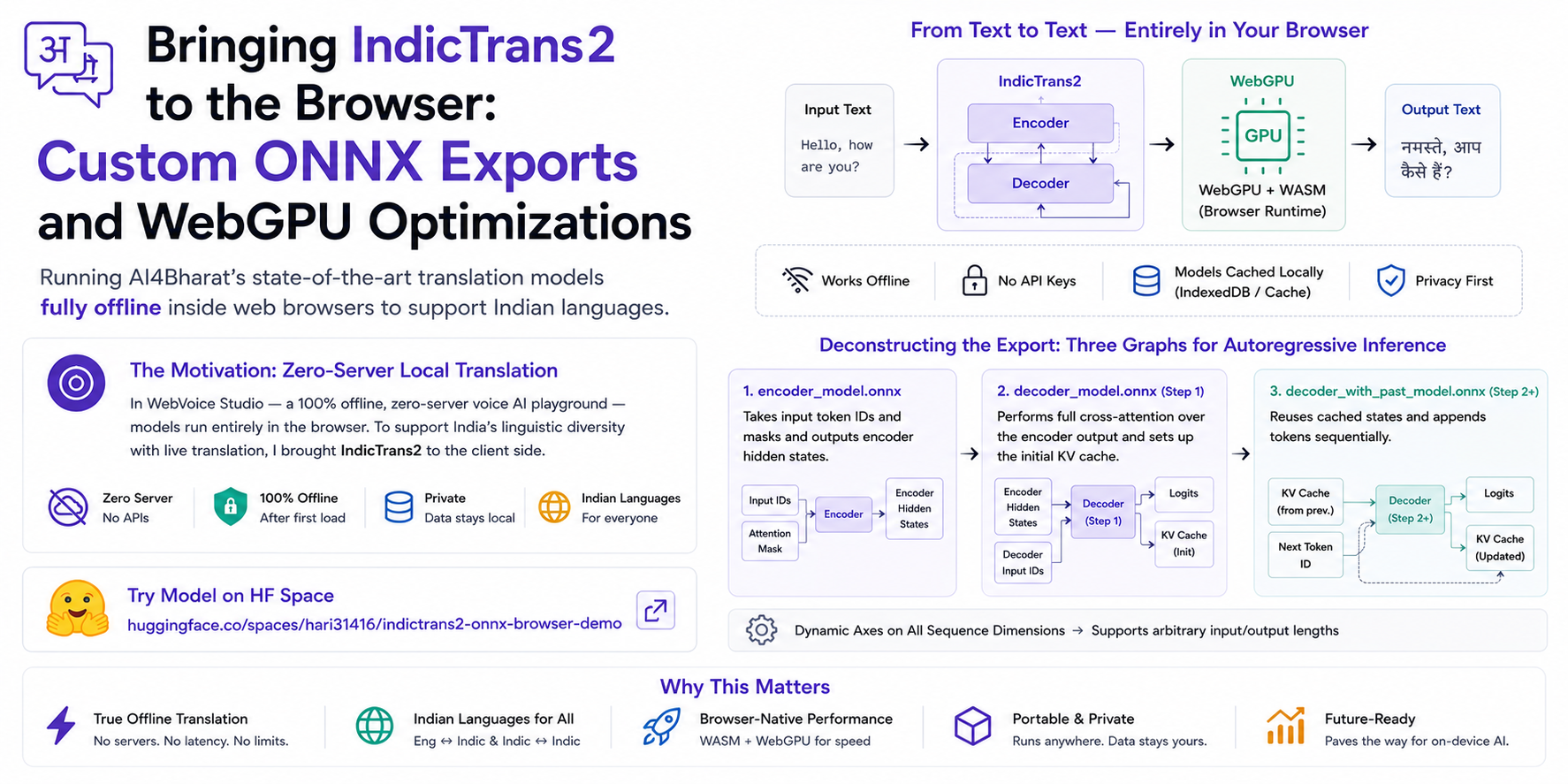
Table of Contents
- The Motivation: Zero-Server Local Translation
- Deconstructing the Export and Why Optimum Fails
- The Parity Trap and Debugging False Positives
- The Tokenizer Vocabulary Remapping Nightmare
- Shrinking the Models via ONNX Size Optimizations
- Quantization Pitfalls and Precision Tiers
- Quantization Benchmarks and Accuracy vs Efficiency Tradeoffs
- Mapping the Limits and Browser Engine Constraints
- Conclusion and the Price of Edge Autonomy
Introduction
Over the last year, WebAssembly (WASM) has matured, WebGPU has landed in mainstream browsers, and machine learning models have shrunk to sizes that fit comfortably on a phone or a modest laptop. This post details the journey of bringing AI4Bharat's IndicTrans2 models to the client side, running fully offline inside web browsers to support Indian languages.
The Motivation: Zero-Server Local Translation
To understand this journey, I must start with the application that motivated it: WebVoice Studio (see the GitHub repository). WebVoice Studio is a 100% offline, zero-server voice AI playground running entirely in the browser. Using browser-native technologies, it orchestrates voice activity detection, speech-to-text, LLM generation, and text-to-speech dynamically. After the first load, the models are stored in IndexedDB or the browser cache. No API keys are required, and no user voice or text data leaves the local device.
However, WebVoice Studio was initially restricted to English (with partial support for Hindi) conversational models. Given India's immense linguistic diversity, supporting only one or two languages severely limits accessibility. To make WebVoice Studio truly useful across different regions, I wanted to add robust support for multiple Indian languages and a live translation feature. Rather than calling a translation API on a remote server (which breaks the zero-server, offline promise of the project), I set out to run IndicTrans2—the state-of-the-art model for Indian languages—directly inside browser execution engines.
When searching for pre-existing ONNX exports of IndicTrans2 in the community, the only ONNX model I could find was naklitechie/indictrans2-en-indic-dist-200M, which I used as a reference. However, since not all translation directions (English-to-Indic, Indic-to-English, and Indic-to-Indic) or scales (the distilled 200M/320M versions and the full 1B versions) were available or optimized for browser runtimes, I decided to build a standalone, robust Python-based export pipeline to package all six configurations into browser-ready ONNX bundles.
Deconstructing the Export and Why Optimum Fails
My first step was trying standard tools like Hugging Face Optimum1. Unfortunately, optimum-cli fails on IndicTrans2 due to its custom architecture, raising errors like ValueError: custom IndicTrans architecture. Because the model architecture is custom-built by AI4Bharat and is not natively registered, I had to bypass Optimum entirely (see Optimum's custom export guide2 for details on how custom model configs must otherwise be registered).
Instead, I built manual exporters using raw torch.onnx.export wrapped around PyTorch wrapper modules that match the required browser input-output signatures.
Sequence-to-sequence autoregressive models cannot be exported as a single monolithic graph. This is because the input signature changes between the first step (which processes the full encoder hidden states) and the subsequent steps (which reuse the key-value cache and append new tokens sequentially). I resolved this by exporting three distinct ONNX graphs:
encoder_model.onnx: Takes input token IDs and masks and outputs encoder hidden states.decoder_model.onnx(Step 1): Performs full cross-attention over the encoder output and sets up the initial key-value (KV) cache.decoder_with_past_model.onnx(Step 2+): Reuses the cached encoder KV states and appends decoder self-attention KV states sequentially.
To make the graphs work for arbitrary input sizes, I configured dynamic axes on all sequence length dimensions for both inputs and outputs, ensuring I did not lock the graphs to the length used during PyTorch tracing.
The Parity Trap and Debugging False Positives
During the first successful run of my validation script, I was thrilled to see 100% token-exact parity between the PyTorch model and my newly exported ONNX graphs. I compiled the code and loaded the models in the browser, only to find that the translated output was repetitive, hallucinated gibberish after the first word.
This led to the discovery of a silent, false-positive validation bug in my cross-attention path.
In the autoregressive step 2+ wrapper, encoder_hidden_states was passed as None to the decoder module to represent an autoregressive run. Inside AI4Bharat's original modeling_indictrans.py source code, there is a conditional check if encoder_hidden_states is not None: wrapped around the cross-attention block. Passing None during ONNX tracing caused the exporter to completely skip compiling the cross-attention block into the ONNX graph.
The model worked fine for the first token, but could not attend to the source sentence for any subsequent tokens.
Why did my validation script report 100% parity? The validation script's manual PyTorch decode loop had the exact same bug where it passed None for encoder_hidden_states during steps 2+. Both the PyTorch oracle and the ONNX model were running the same broken code and outputting the same malformed predictions, resulting in a false-positive pass.
I fixed the bug by modifying the wrapper to construct a dummy tensor of zeros representing the encoder sequence length dynamically during tracing. This forced the tracer to compile the cross-attention block and correctly read the cached cross-attention key-value states at runtime.
The Tokenizer Vocabulary Remapping Nightmare
Even with functionally correct graphs, text translation failed. When comparing token IDs generated by the fast browser tokenizers against the slow PyTorch tokenizer, I found a 0% token match.
Converting the SentencePiece models (model.SRC and model.TGT) using Hugging Face's standard SpmConverter yielded SentencePiece-native token IDs. However, IndicTrans2 uses custom vocabulary mappings defined in dict.SRC.json and dict.TGT.json where tokens are re-indexed.
Additionally, vocabularies are not simple mirrors between directions. For example, the English-to-Indic model has a different mapping layout than the Indic-to-English model.
This indexing discrepancy stems from Fairseq's3 core design: during binarization, Fairseq constructs its own vocabulary dictionary sorted by token frequency in the training corpus and prepends default special tokens (<s>, <pad>, </s>, <unk>). In contrast, SentencePiece assigns native IDs during subword training independent of Fairseq's frequency ordering. The official slow tokenizer (tokenization_indictrans.py4) handles this by loading the SentencePiece models solely for subword segmentation, then looking up the resulting token strings in dict.SRC.json and dict.TGT.json to get the actual model input IDs. Hugging Face's standard SpmConverter5 only converts the SentencePiece model and maps directly to its native IDs, completely bypassing this custom dictionary lookup and causing the token ID mismatch.
To align the tokenizers, I built a remapping script that:
- Converts the SentencePiece vocab using
SpmConverter. - Remaps every vocabulary entry to the ID specified in the original dict JSON files.
- Registers the target language tags (like
hin_Devaortel_Telu) as added special tokens with single-word status. - Adds template post-processing to append the end-of-sequence token (
</s>, ID 2) to match model expectations.
With vocabulary remapping in place, fast tokenizer validation reached 100% exact parity.
Shrinking the Models via ONNX Size Optimizations
Raw exports of sequence-to-sequence models are bloated. Standard torch.onnx.export traces serialize a full copy of all model weights into every graph that references them. Because both of my decoder graphs share almost all layer parameters, my naive export duplicated all decoder weights on disk.
For the 200M English-to-Indic model, this duplication caused the weight footprint to balloon. Furthermore, IndicTrans2 ties the decoder token embedding weights and the output project head (lm_head.weight). My raw export serialized this shared 251 MB matrix twice within each decoder file, resulting in 502 MB of redundant storage per graph.
I implemented three post-export size optimizations using python scripts to prune this bloat:
- Tied-Weight Deduplication: I performed graph surgery on the ONNX models to route the token embedding
Gatheroperators directly through thelm_head.weighttensor, removing the duplicate embedding initializers and saving ~500 MB on FP32 bundles. - Shared Decoder Sidecar: I refactored both
decoder_model.onnxanddecoder_with_past_model.onnxto read weight parameters from a single, shared external data file (decoder_shared.onnx.data) via content-addressed offsets, cutting the decoder size in half on disk. - ONNX Runtime Graph Fusion: I ran the ONNX Runtime graph optimizer to merge redundant operators, reducing the
decoder_modelnode count from 3,696 to 1,662 nodes.
Before these optimizations, the FP32 English-to-Indic bundle consumed ~1.9 GB on disk. After surgery, it shrank to ~1.05 GB with zero parity loss.
Quantization Pitfalls and Precision Tiers
To make the models practical for browser downloads, I had to compress them further using lower-precision formats like FP16, INT8, and 4-bit (Q4F16). This process introduced its own set of challenges.
The FP16 Bias Tensor Type Mismatch
When converting the models to float16 using onnxconverter-common6, ONNX Runtime failed to load the resulting graphs, throwing validation errors complaining that input types to Add nodes were mismatched.
While the utility converted weight matrices to float16, it left bias vector initializers as float32 (a mixed-precision issue detailed in the ONNX Runtime Model Optimization Guide7). When the execution provider ran the graph, it fed the float16 outputs of MatMul nodes and the float32 biases into Add operators, causing type check failures.
I solved this by switching to ONNX Runtime's internal transformers converter:
from onnxruntime.transformers.float16 import convert_float_to_float16

model_fp16 = convert_float_to_float16(
    model_fp32,
    keep_io_types=True,
    force_fp16_initializers=True,
    disable_shape_infer=True,
)
del model_fp16.graph.value_info[:]
By forcing the initializers to float16 and clearing intermediate shape annotations (allowing ONNX Runtime to re-infer them cleanly on load), the type check mismatches disappeared.
The 4-bit CPU Emulation Trap
During initial benchmarks of the 4-bit weight-only quantized (q4f16) model on CPU, accuracy collapsed, showing only a 62.5% exact token match against the FP32 oracle.
I discovered that the default 4-bit quantization configuration used accuracy_level=2, which forces float16 scales and activations. While this performs well on GPU architectures with native half-precision support, the browser WebAssembly (WASM) CPU execution provider lacks FP16 hardware kernels. It falls back to software emulation, introducing numerical drift that shifted the output logits and diverged token generation.
I resolved this by tuning the quantization parameters to use accuracy_level=4, forcing int32 accumulation for CPU computations. This recovered accuracy to 75.0% on CPU while retaining the option to use accuracy_level=2 on WebGPU targets.
Quantization Benchmarks and Accuracy vs Efficiency Tradeoffs
Through testing, I observed that model scale plays a massive role in quantization robustness. Larger models are much more resistant to low-bit precision losses.
Below is the accuracy comparison of the 200M/320M distilled models against the 1B full models (see the full details in the BENCHMARKS.md8 report). Parity is measured as exact token match rates against the FP32 ONNX oracle on 1,100 golden fixtures.
Quantization Parity (200M/320M Models)
| Direction | Format | Model Size | Token Match | Text Match | Speedup |
|---|---|---|---|---|---|
| en-indic | FP16 | 559.6 MB | 99.64% | 99.64% | 0.73x |
| en-indic | INT8 | 302.7 MB | 74.36% | 74.36% | 1.59x |
| en-indic | Q4F16 | 380.6 MB | 55.18% | 55.64% | 0.70x |
| indic-en | FP16 | 471.4 MB | 99.91% | 99.91% | 0.84x |
| indic-en | INT8 | 257.3 MB | 85.64% | 85.64% | 1.17x |
| indic-en | Q4F16 | 292.4 MB | 73.36% | 73.36% | 0.74x |
| indic-indic | FP16 | 671.9 MB | 99.82% | 99.82% | 0.84x |
| indic-indic | INT8 | 370.9 MB | 72.18% | 72.36% | 1.47x |
| indic-indic | Q4F16 | 492.9 MB | 45.91% | 46.36% | 0.82x |
Quantization Parity (1B Models)
| Direction | Format | Model Size | Token Match | Text Match | Speedup |
|---|---|---|---|---|---|
| en-indic | FP16 | 2.11 GB | 99.73% | 99.73% | 0.93x |
| en-indic | INT8 | 1.08 GB | 89.55% | 89.55% | 2.12x |
| en-indic | Q4F16 | 1.01 GB | 82.45% | 82.55% | 1.18x |
| indic-en | FP16 | 1.94 GB | 99.82% | 99.82% | 0.98x |
| indic-en | INT8 | 1020.1 MB | 94.45% | 94.45% | 1.90x |
| indic-en | Q4F16 | 861.5 MB | 88.55% | 88.55% | 1.08x |
| indic-indic | FP16 | 2.31 GB | 99.82% | 99.82% | 0.87x |
| indic-indic | INT8 | 1.19 GB | 83.64% | 83.73% | 2.24x |
| indic-indic | Q4F16 | 1.21 GB | 73.18% | 73.18% | 1.08x |
While FP16 remains lossless across all models, INT8 and Q4F16 drop severely on the 200M variants (e.g., indic-indic 4-bit dropping to 45.91% token match). In contrast, the 1B models hold up remarkably well, with 1B indic-en INT8 retaining 94.45% accuracy and 1B en-indic Q4F16 remaining above 82.45%.
For deployment, FP16 represents the best size-to-quality choice for smaller models, whereas 4-bit (Q4F16) or INT8 is highly effective for larger scales.
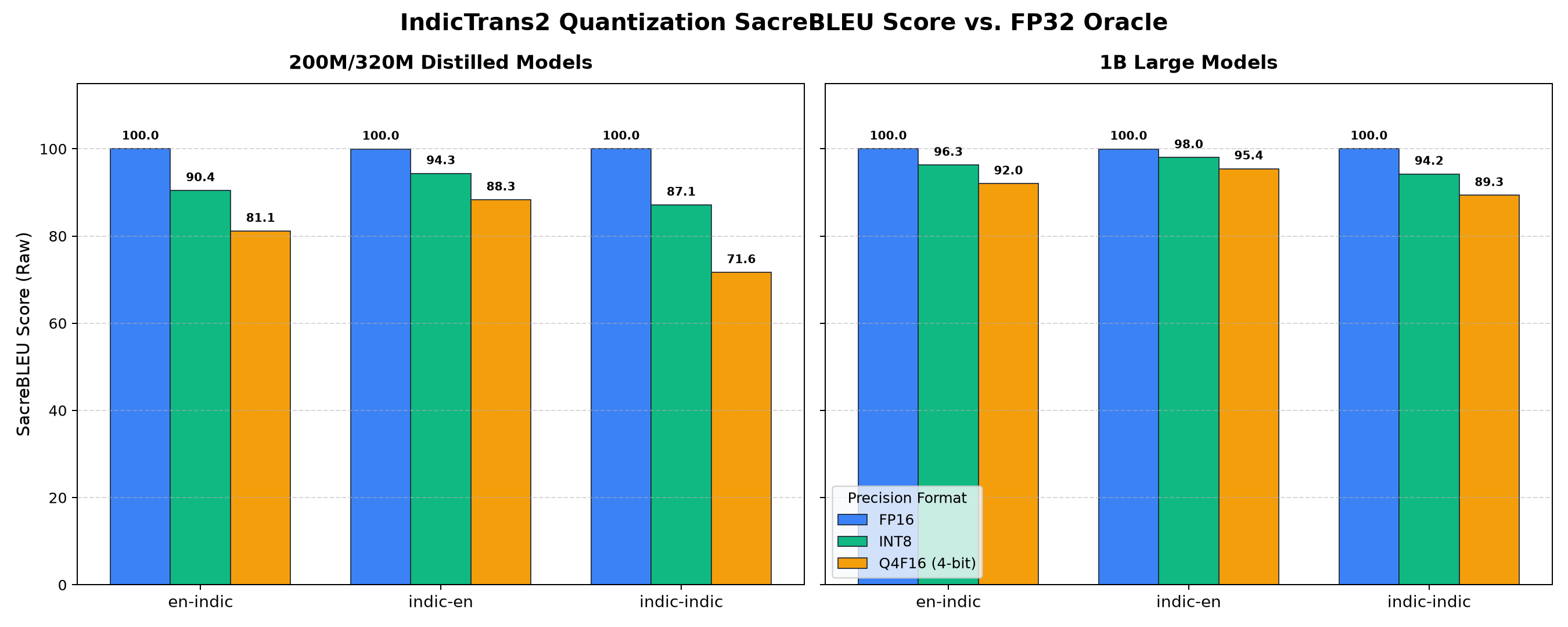
Figure 1: Quantization SacreBLEU score comparison across different model directions and sizes.
Mapping the Limits and Browser Engine Constraints
Running deep learning models containing up to a billion parameters pushes browsers to their architectural limits. During live testing in Chrome, I cataloged several engine ceilings that determine which configurations can run:
- 32-Bit WebAssembly Memory Ceiling (4 GB): Current browsers compile WebAssembly in a 32-bit linear address space, meaning a single thread cannot address more than 4 GB of RAM (as specified in the MDN WebAssembly Memory Documentation9). Loading a 1B model (which requires loading the encoder, decoder, and decoder-with-past graphs simultaneously) in FP32 or FP16 consumes over 4.5 GB of weight memory alone, causing an immediate browser crash.
- WebGPU Buffer Binding Limit (2 GB): The WebGPU standard dictates a strict limit of 2 GB for any single memory buffer allocation (the
maxBufferSizelimit defined in the W3C WebGPU Specification10). In a 1B model exported in full 32-bit floats, the main decoder weight tensor alone exceeds 2.8 GB, triggering compilation failures during VRAM buffer binding. - WebGPU Shader INT8 Incompatibility: ONNX Runtime Web's WebGPU execution provider compiles shaders on-the-fly. It does not support integer quantized matrix multiplications (
MatMulInteger,DynamicQuantizeLinear) on WebGPU shaders (see the tracking of supported operators in the ONNX Runtime WebGPU Operator Documentation11), leading to validation crashes or garbled output. - Throughput Surprises on CPU: For smaller 200M/320M models, WASM CPU FP32 runs at a blazing 102.5 tokens/second, whereas WebGPU FP32 drops to 15.2 tokens/second. Because the model is small, the overhead of CPU-GPU buffer transfers and command submissions bottlenecks WebGPU, making the CPU faster. However, at the 1B scale, WebGPU Q4F16 hits 16.3 tokens/second, while CPU performance collapses to an unusable 2.4 tokens/second (detailed in the absolute reports at
BENCHMARKS.md8 andLIVE_BENCHMARKS.md12).
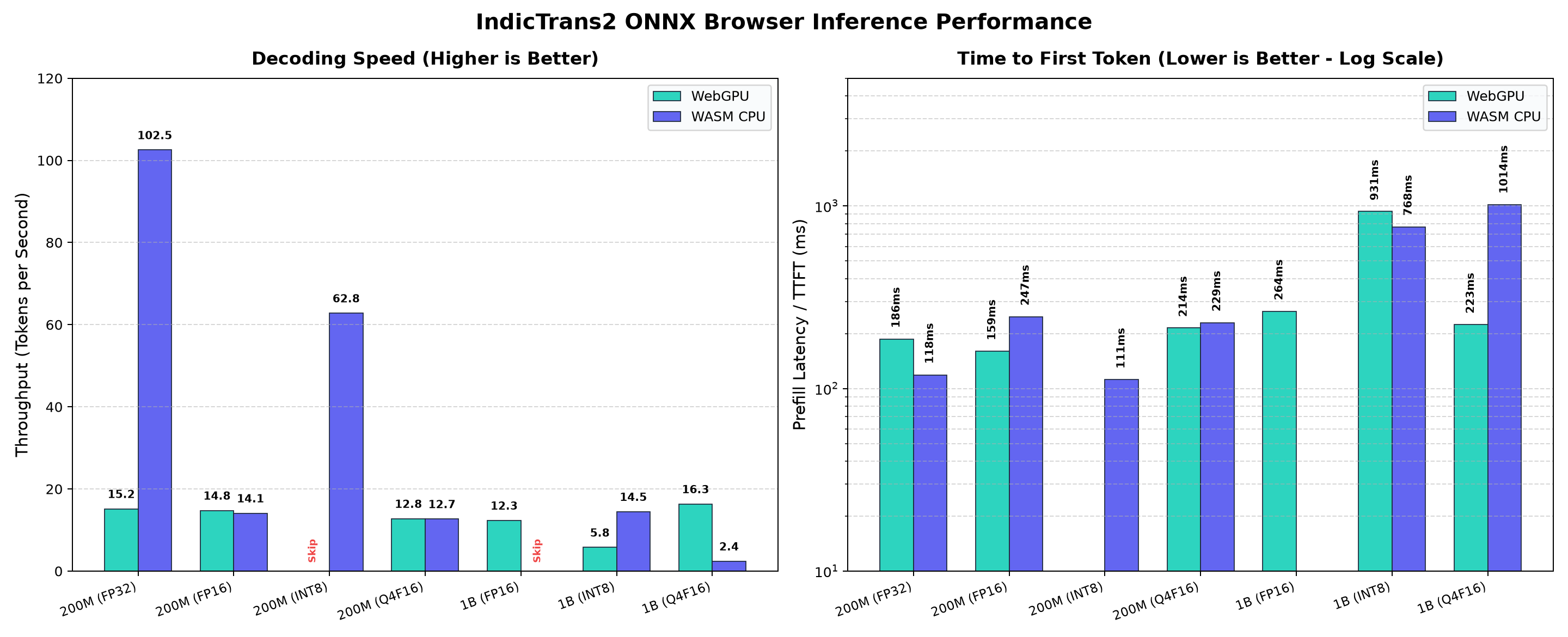
Figure 2: Live browser benchmarks showing average tokens per second and Time-to-First-Token latency profiles across WASM CPU and WebGPU execution providers. (Note: Benchmarks were conducted on an Macbook M4 Pro; actual performance may vary across different consumer hardware.)
Conclusion and the Price of Edge Autonomy
By building a dedicated pipeline to resolve wrappers, patch cross-attention bugs, rewrite tokenizers, and execute graph surgeries, I successfully brought IndicTrans2 models to the web. The final models are published to Hugging Face, split across the IndicTrans2 200M/320M ONNX exports and the IndicTrans2 1B ONNX exports collections. You can try running them online in the IndicTrans2 ONNX Browser Demo HF Space. All the code, optimization scripts, and templates are available in the indictrans2-onnx-export GitHub repository.
Ultimately, deploying AI models on the edge goes beyond standard compilation. It requires addressing practical software challenges like memory layout optimization, graph adjustments, runtime provider configurations, and browser sandbox constraints. For developers building serverless web applications, understanding these graph optimization tools is key to achieving offline performance.