
Building Multilingual Apps with indic-language-utils
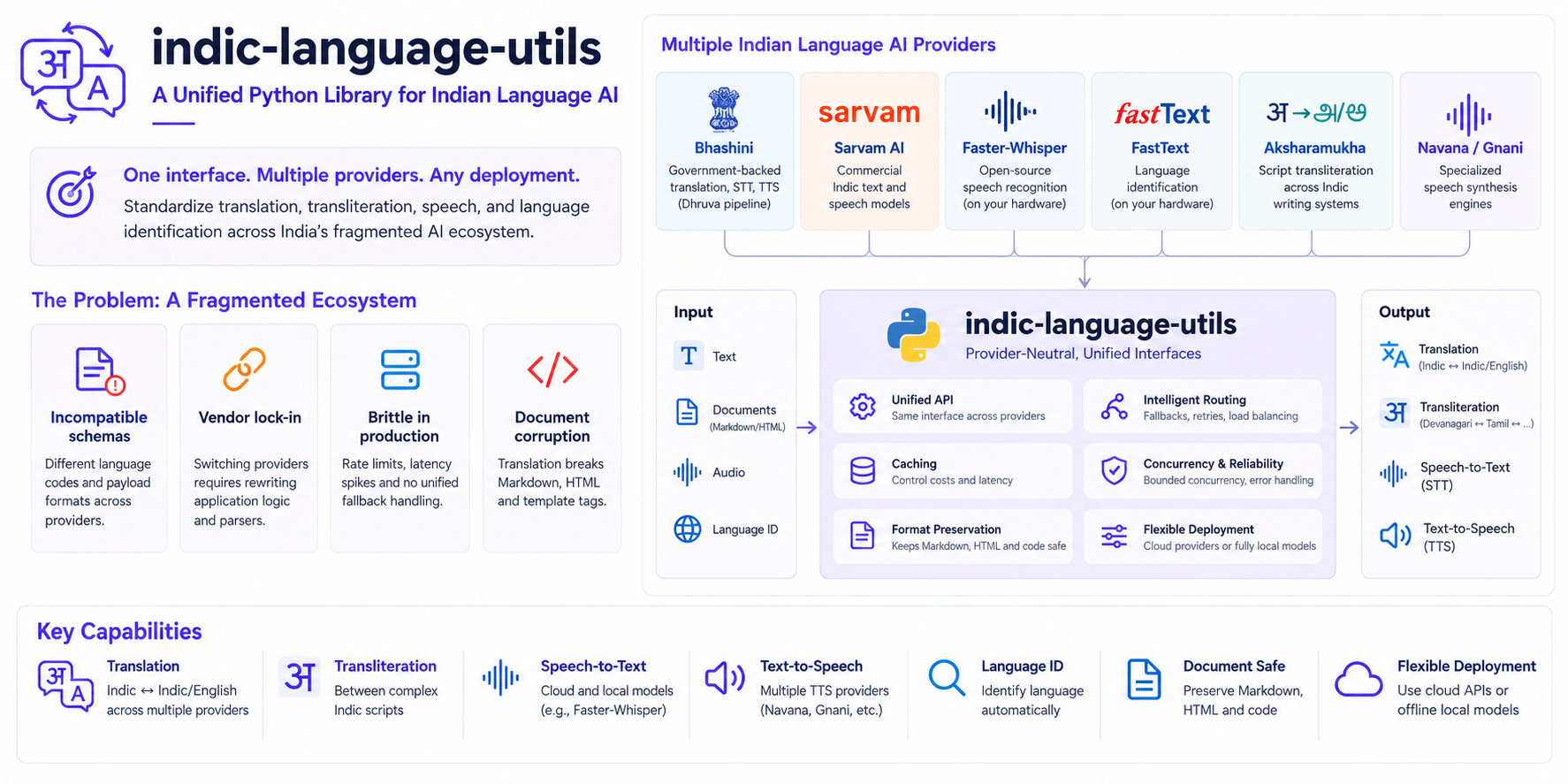
Table of Contents
- The hidden friction in Indian language software
- Getting started with zero credentials
- A provider-neutral architecture
- Protecting structured documents and code
- Engineering resilience into production pipelines
- Working with speech across providers
- Adding your own provider
- Developer tooling and AI coding agents
- Limits of provider interchangeability
- Summary and resources
Introduction
In my day-to-day work building Gov-Tech platforms, multilingual support is never an optional add-on; it is a baseline requirement. Citizen-facing portals, grievance redressal chatbots, and field-worker tools must serve populations across dozens of languages and scripts.
This creates two recurring engineering demands. When building rapid proofs-of-concept (PoCs) for conversational bots or localized voice interfaces, I need to prototype translation, script transliteration, and speech synthesis immediately without waiting days for cloud credentials or writing throwaway adapter scripts. But when transitioning those PoCs toward production, requirements flip: we need rock-solid provider fallbacks, persistent caching to control cloud costs, bounded concurrency, and the ability to drop in offline local models when network access is restricted or unavailable.
The friction is that the Indian language AI ecosystem is deeply fragmented:
- Bhashini provides government-backed cloud models for translation, STT, and TTS through its Dhruva pipeline architecture.
- Sarvam AI offers commercial models for Indic text and speech.
- Faster-Whisper and FastText run speech recognition and language identification on your own hardware.
- Aksharamukha handles script transliteration across complex Indic writing systems.
- Navana and Gnani provide specialized speech engines.
Every provider operates as an isolated silo with unique payload formats, authentication handshakes, and incompatible language codes. Writing application logic directly against their bespoke APIs tightly couples your code to a single vendor.
The hidden friction in Indian language software
In practice, integrating these heterogeneous tools into chatbots and public-sector platforms exposes four recurring technical bottlenecks:
- Incompatible schemas and language codes: One service expects
hi, another expectshin, a third requireshi-IN, and some require internal numeric pipeline identifiers. Writing glue code to translate between these formats adds boilerplate across repositories. - Vendor lock-in and migration cost: If an external cloud provider experiences an outage, changes pricing, or degrades in accuracy, switching providers requires refactoring every API call and payload parser in your backend.
- Brittleness in production: Public endpoints experience intermittent rate limits and latency spikes. Without centralized fallback routing, bounded concurrency, and retry logic, end-user applications fail when a single provider stalls.
- Document and markup corruption: Neural machine translation models are trained on raw text. When passed Markdown documentation, HTML snippets, or UI strings with template tags, they often translate syntax markers, truncate URLs, or rewrite variable names inside backticks.
After repeatedly rewriting the same schema translation glue, retry logic, and provider wrappers across multiple projects, I designed and built indic-language-utils. It is an open-source, provider-neutral Python library that standardizes Indic text, transliteration, and speech capabilities under a clean, unified set of interfaces.
In this walkthrough, I will explore how the library tackles these integration hurdles. We will begin with a zero-credential quickstart for local text detection, transliteration, and translation, examine the underlying provider-neutral architecture, look at how it protects structured Markdown documents from translation corruption, and walk through configuring production-grade fallback routing and speech pipelines.
Getting started with zero credentials
You can start developing immediately without signing up for paid APIs or waiting for cloud credentials. The library provides offline adapters and free community backends for local development and testing.
Use Python 3.11 or 3.12. Install the core package, the local transliteration and detection extras, and the unofficial Google Translate adapter:
pip install "indic-language-utils[local-tld,local-transliteration,googletrans]"
Or using uv:
uv add "indic-language-utils[local-tld,local-transliteration,googletrans]"
Select Google Translate for translation in the same shell:
export TRANSLATION_SERVICE_PROVIDER="googletrans"
FastText and Aksharamukha run locally. FastText may download model files on first use. Google Translate requires network access and uses an unofficial adapter, so this example is suitable for development rather than a guaranteed production service.
The following example detects language and script, transliterates text into Roman script, and translates the sentence into Tamil:
from indic_language_utils import (
    detect_sync,
    transliterate_sync,
    translate_sync,
)

sample_text = "डिजिटल शासन सेवाओं में आपका स्वागत है।"

# Language and script detection via local FastText
detection = detect_sync(sample_text)
print(f"Language: {detection.language}")  # hi-IN
print(f"Script: {detection.script}")  # Deva
print(f"Confidence: {detection.candidates[0].confidence:.2%}")

# Transliterate from Devanagari to Latin script
translit = transliterate_sync(sample_text, source="hi", target="en")
print(f"Romanized: {translit.text}")

# Translate to Tamil
translation = translate_sync(sample_text, "hi", "ta")
print(f"Tamil: {translation.text}")
Aksharamukha uses ITRANS for Roman output by default, so capital letters in the transliteration carry pronunciation information.
These text operations have synchronous helpers and asynchronous equivalents: detect, translate, and transliterate. Speech examples below use asynchronous clients.
A provider-neutral architecture
The core philosophy of indic-language-utils is separation of concerns. Your business logic talks to high-level capability interfaces:
- Translation
- Text language detection
- Script identification
- Transliteration
- Speech-to-text (STT)
- Text-to-speech (TTS)
The library maintains a canonical language registry covering all 22 Eighth Schedule Indian languages plus English, normalizing supported language codes and common aliases to canonical BCP 47 tags. Registry coverage does not mean every provider supports every language.
Underneath these interfaces, provider adapters convert standard requests into provider-specific payloads. For supported capabilities and language pairs, you can switch providers through configuration or environment variables while keeping the same client calls. Provider-specific model and voice settings still need to be configured.
Provider-neutral architecture: decoupling application logic, capability routing, and backend engines.
The adapters cover different capabilities:
| Provider | Translation | Detection | Transliteration | STT | TTS |
|---|---|---|---|---|---|
| Bhashini | Yes | Yes | Yes | Yes | Yes |
| Sarvam | Yes | Yes | No | Yes | Yes |
| Navana | No | No | No | No | Yes |
| Gnani | No | No | No | Yes | Yes |
| Google Translate | Yes | No | No | No | No |
| FastText | No | Yes | No | No | No |
| Aksharamukha | No | No | Yes | No | No |
| Faster-Whisper | No | No | No | Yes | No |
| Edge TTS | No | No | No | No | Yes |
For example, selecting Google Translate during development uses this route in .indic-language-utils.toml:
[routes]
translation = ["googletrans"]
Once Sarvam credentials are configured, changing it to translation = ["sarvam"] switches the backend. If you set TRANSLATION_SERVICE_PROVIDER for the quick start, unset it so the TOML route determines the provider. The call translate_sync(sample_text, "hi", "ta") stays the same. The provider reference lists dependencies and setup requirements, including additional adapters.
Protecting structured documents and code
One of the most frustrating parts of translating documentation, technical blogs, or localized user interfaces is markup degradation. Translating a Markdown sentence like:
Run `uv sync` and visit [our portal](https://example.gov.in) to continue.
often results in broken URLs, translated command strings, or missing backticks.
indic-language-utils includes structural pre-processors and post-processors that parse the text before passing it to translation engines. With Markdown mode enabled, code blocks and structural markers are retained, while inline code spans and URLs are protected with placeholders. Once the neural translation completes, the original syntax elements are restored into their correct positions.
from indic_language_utils import TextFormat, TranslationOptions, translate_sync

markdown_input = """
### Installation

Run `pip install indic-language-utils` to get started.
Visit [documentation](https://example.com/docs) for full reference.
"""

result = translate_sync(
    markdown_input,
    "en",
    "hi",
    options=TranslationOptions(text_format=TextFormat.MARKDOWN),
)
print(result.text)
Markdown mode preserves the heading level, the backtick code span, and the hyperlink structure while translating the surrounding text. If a provider drops a placeholder, the client attempts recovery; this can make the wording around the protected value less natural.
Engineering resilience into production pipelines
Moving from prototyping to production requires handling network failures, controlling cloud costs, and respecting rate limits.
Instead of writing custom retry loops and caching logic for each provider, indic-language-utils handles reliability centrally.
Multi-provider fallback routing
You can configure fallback chains per capability. If your preferred provider hits a rate limit, times out, or returns a transient or malformed response, the client can fall back to the next compatible engine. Authentication and invalid input errors stop the request:
[routes]
translation = ["sarvam", "bhashini", "googletrans"]
speech_to_text = ["bhashini", "sarvam", "faster_whisper"]
text_to_speech = ["sarvam", "bhashini", "edge_tts"]
Persistent SQLite caching
Translating repetitive UI strings or running recurring batch jobs can quickly inflate cloud bills. The library includes an integrated caching layer with in-memory LRU and SQLite backends.
The SQLite backend uses Write-Ahead Logging (WAL mode) to support a shared cache across processes. Clients also coalesce concurrent requests for identical keys within a client instance, reducing duplicate provider calls. SQLite still coordinates writes through database locks.
Concurrency and backoff controls
Built-in provider adapters use bounded concurrency limits to avoid exceeding API tier limits. Requests that encounter transient network issues use exponential backoff with randomized jitter to prevent thundering herd problems.
A project configuration file named .indic-language-utils.toml in your repository root sets these behaviors:
[cache]
enabled = true
backend = "sqlite"
path = ".cache/translations.sqlite3"
ttl_seconds = 86400

[retry]
max_attempts = 3
base_delay_seconds = 0.25
max_delay_seconds = 5.0

[providers.sarvam]
endpoint = "https://api.sarvam.ai"
max_concurrency = 8

[providers.bhashini]
endpoint = "https://dhruva-api.bhashini.gov.in/services/inference/pipeline"
max_concurrency = 8
Working with speech across providers
Voice interactions are critical for Indian digital services. indic-language-utils standardizes speech-to-text (STT) and text-to-speech (TTS) interfaces across cloud engines like Sarvam, Bhashini, Gnani, and Navana, as well as local speech recognition with Faster-Whisper and keyless online synthesis with Edge TTS.
Install the extras or configure the credentials and model IDs for your speech routes before running this example. Provide a Hindi recording named query.wav with a sample rate of 16 kHz; the library does not resample the file. See the STT setup guide and TTS setup guide for route configuration. The text quick-start extras do not install speech adapters.
import asyncio
from pathlib import Path

from indic_language_utils import TTSOptions, get_stt_client, get_tts_client


async def voice_pipeline() -> None:
    # Speech-to-text
    async with get_stt_client() as stt:
        audio_data = Path("query.wav").read_bytes()
        transcript = await stt.transcribe(
            audio_data,
            language="hi",
            audio_format="wav",
            sampling_rate=16000,
        )
        print(f"Transcript: {transcript.text}")

    # Text-to-speech
    async with get_tts_client() as tts:
        speech = await tts.synthesize(
            "नमस्ते, आपकी सेवा में उपस्थित हूँ।",
            language="hi",
            options=TTSOptions(
                provider_parameters={
                    "bhashini": {"gender": "female"},
                    "edge_tts": {"gender": "female"},
                }
            ),
        )
        Path(f"response.{speech.audio_format or 'bin'}").write_bytes(speech.audio)


asyncio.run(voice_pipeline())
If you decide to swap the TTS backend from Bhashini to Sarvam or Navana, your Python calling code stays identical. Update the route and configure the new provider's model, voice options, and credentials. The returned audio format may also change.
Adding your own provider
If your team maintains an in-house model or private inference endpoint, implement the matching capability protocol and pass the adapter to a client factory through additional_providers. A translation adapter declares its identity and capabilities and implements translate_batch().
Using the adapter through the standard client gives it the client's routing, caching, and translation processing. Retry handling and concurrency controls need to be implemented in the adapter where appropriate. The provider contribution guide includes a complete example and registration options.
Developer tooling and AI coding agents
The repository includes tools designed to speed up developer workflows:
- Local evaluation workbench: You can inspect translations, test script detection, and test audio playback interactively in a local web interface. From a source checkout, run
uv sync --dev, build the UI withpnpm installandpnpm buildinsideweb/, then runuv run indic-serverfrom the repository root. The UI opens athttp://127.0.0.1:8000; its assets are not included in the Python wheel. - Coding agent skill: If you use AI coding assistants like Cursor, Claude Code, or Antigravity, you can point your assistant to the library skill for API patterns and setup instructions:
Use https://raw.githubusercontent.com/Hari31416/indic-language-utils/main/skills/indic-language-utils/SKILL.md to add Indic language translation to this project.
The skill gives the assistant examples of provider selection, dependency extras, and typed client calls. Review the generated integration against your application's requirements.
Limits of provider interchangeability
A shared interface reduces integration work, but providers still differ in language coverage, model quality, latency, and voice options. A fallback is useful only when it supports the requested capability and language pair. Test the providers in your route with representative text or audio before depending on them in production.
Keyless online adapters such as Google Translate and Edge TTS require network access and do not offer the same guarantees as a contracted API. Local models avoid those network dependencies after setup, but need model files and suitable hardware. Markdown protection preserves supported syntax; it does not guarantee translation quality or protect every arbitrary template format.
Summary and resources
Indian language applications require flexibility. Tying your codebase directly to a single vendor or API model introduces technical debt and downtime risks.
indic-language-utils gives you provider neutrality, built-in resilience, and document protection under a single standardized interface.
- PyPI:
pip install indic-language-utils - GitHub repository: Hari31416/indic-language-utils
- Documentation: Read the documentation
Issues, feedback, and pull requests adding new providers or improving existing capabilities are welcome.