Serverless RAG Across AWS, Azure, and GCP
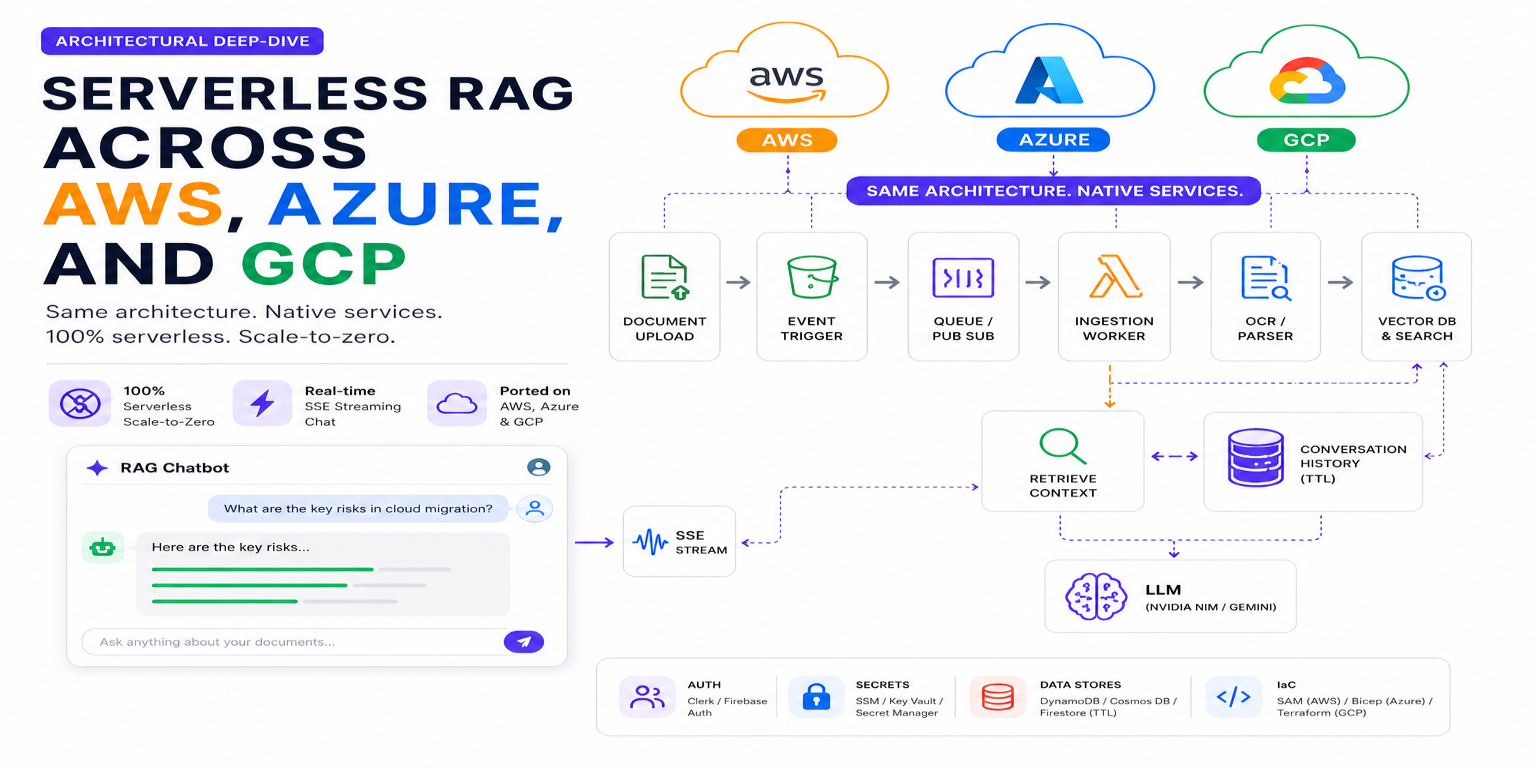
Table of Contents
- Serverless RAG Across AWS, Azure, and GCP
- The Backstory
- High-Level Architectural Blueprint
- Compute & Real-time Streaming (SSE)
- Decoupled Ingestion & OCR Pipelines
- Vector & State Databases
- Costing & Scale-to-Zero Comparison
- Answering the Questions
- Multi-Cloud Architecture
- Get the Code
Serverless RAG Across AWS, Azure, and GCP
Retrieval-Augmented Generation (RAG) is the default architectural pattern for building context-aware AI assistants. However, hosting RAG pipelines traditionally involves running persistent database clusters (like pgvector or Qdrant) and dedicated VM nodes for API servers and ingestion workers. This model introduces high baseline costs—often $50 to $150/month—even if the assistant is idle.
To solve this, I built and deployed a feature-equivalent, production-grade RAG Chatbot on all three major cloud providers (AWS, Azure, and GCP), utilizing a strictly 100% serverless, scale-to-zero compute and storage stack.
The Backstory
Most of my daily professional work involves developing Gov-Tech platforms deployed entirely on-premises due to strict data privacy and regulatory compliance. While on-premises hardware has its strengths, I wanted to step outside my comfort zone and master serverless architectures. During my initial research into AWS implementations, I came across RAGStack-Lambda, which served as a key inspiration for building a serverless RAG pipeline. However, I wanted to go a step further and design a comparative architecture across AWS, Azure, and GCP.
Specifically, I wanted to answer three questions:
- Can we host RAG 100% free (or something that costs only a few dollars/month) for personal use?
- How hard is it to port serverless architectures between providers?
- What is the practical developer friction on each cloud platform?
I realized that the best way to answer these questions was to build a feature-equivalent RAG Chatbot on all three major cloud providers. Here is my journey, architectural deep-dive, costing details, and final verdict on which cloud provider offers the best experience for serverless RAG applications.
High-Level Architectural Blueprint
The platform's goal is to decouple synchronous, low-latency chat interactions (requiring real-time streaming) from asynchronous, resource-heavy document ingestion and vectorization. I wanted the following core features:
- Real-time Token Streaming: The chatbot API must stream LLM token responses in real-time using Server-Sent Events (SSE) for a responsive user experience.
- Asynchronous Document Ingestion: Users can upload documents (PDFs, images) that are processed asynchronously. The system should handle OCR, chunking, embedding generation, and vector indexing without blocking the chat API.
- Scale-to-Zero: All components (API, ingestion workers, vector database) should scale down to zero when idle to minimize costs.
- User Authentication: A simple JWT-based authentication system to manage user sessions and access control.
- IaC-Driven: The entire infrastructure should be defined as code for reproducibility and ease of deployment.
This requires a multi-layered architecture with distinct components for static web hosting, compute, streaming, event routing, asynchronous job buffering, OCR processing, vector indexing, and state management. Here is how the three architectures map across the cloud providers:
| Architecture Layer | AWS SAM Stack | Azure Native Stack | GCP Native Stack |
|---|---|---|---|
| Static Web Hosting | Vercel (Custom Domain) | Azure Static Web Apps (SWA) | Firebase Hosting |
| Compute / API Host | AWS Lambda + Lambda Web Adapter | Azure Container Apps (ACA) | Google Cloud Run |
| Streaming (SSE) Route | Lambda Function URLs (FURLs) | ACA Ingress | Cloud Run Ingress |
| Ingestion Event Router | S3 Event Notifications | Event Grid | GCS Object Finalized Event |
| Asynchronous Job Buffer | Amazon SQS + SNS | Azure Storage Queue | Google Cloud Pub/Sub |
| Ingestion Compute | Lambda (Initializer + Processor) | Azure Functions (Consumption) | Cloud Run Ingestion Worker |
| OCR / Document Parsing | AWS Textract | Azure AI Document Intelligence | Google Cloud Document AI |
| Vector DB & Search | Amazon S3 Vectors | Cosmos DB NoSQL (Vector Index) | Firestore Native Mode Vector Index |
| Conversation History | DynamoDB (Single-Table + TTL) | Cosmos DB NoSQL (TTL) | Firestore Native Mode (TTL) |
| User Authentication | Clerk JWT Auth | Clerk JWT Auth | Firebase Authentication |
| Secrets & Keys | SSM Parameter Store | Azure Key Vault | GCP Secret Manager |
| Infrastructure as Code | AWS SAM (template.yaml) | Azure Bicep (.bicep / azd) | Terraform (.tf) |
Compute & Real-time Streaming (SSE)
Real-time token streaming via Server-Sent Events (SSE) is essential for modern chat interfaces. However, serverless compute runtimes handle long-lived TCP streams differently.
AWS: Bypassing the 30-Second API Gateway Limit
AWS API Gateway v2 enforces a strict 30-second timeout and buffers responses by default, which blocks chunk-by-chunk SSE streaming.
- The Solution: Route chat traffic through AWS Lambda Function URLs (FURLs) configured with
InvokeMode: RESPONSE_STREAM1. - Code Adapter: Standard ASGI stream yields are automatically wrapped and flushed chunk-by-chunk directly to the client socket via the LWA proxy layer2 without buffering.
Azure: Container Apps (ACA)
Azure Functions (Consumption plan) can suffer from buffering and cold starts when streaming HTTP responses.
- The Solution: Host the FastAPI container on Azure Container Apps (ACA). ACA Ingress supports HTTP Chunked Transfer Encoding natively.
- Configuration: Set
transport: autoin the Bicep template3 to allow unbuffered TCP stream persistence, delivering sub-second Time-to-First-Byte (TTFB).
GCP: Cloud Run
GCP provides the most elegant container hosting for streaming.
- The Solution: Google Cloud Run natively supports HTTP response streaming out-of-the-box4. There are no gateways to configure, no proxy layers to inject, and no timeout workarounds. Standard containerized FastAPI code streams natively without modifications.
AWS (Lambda + LWA)
Azure (Container Apps)
GCP (Cloud Run)
Compute and real-time streaming architectures comparison across AWS, Azure, and GCP.
Decoupled Ingestion & OCR Pipelines
Document ingestion is asynchronous. When a user uploads a PDF, the API accepts the upload, writes a processing state, saves the file to storage, and returns an immediate 202 Accepted response. The heavy lifting (OCR layout extraction, chunking, embedding generation, and vector indexing) runs out-of-band.
AWS Ingestion: Two-stage Lambda Orchestration
AWS Lambda execution limits require a decoupled flow to avoid paying for idle compute while Textract runs OCR:
- Ingestion Initializer (Lambda 1): Triggered directly by S3 Event notifications, saving on SQS idle polling charges. For plain text, enqueues to SQS. For binary PDFs/images, starts an asynchronous AWS Textract job, writes a job-to-user mapping in DynamoDB with a 48-hour TTL, and exits immediately.
- SNS Completion: Once Textract finishes OCR, it publishes a message to an SNS topic, which forwards it to SQS.
- Ingestion Processor (Lambda 2): Triggers only when the SQS queue receives completion notifications via the SNS TextractCompletionTopic. It fetches Textract results in a single call (bypassing busy polling loops), generates embeddings, and indexes them in Amazon S3 Vectors.
Azure Ingestion: Blob to Function Pipeline
Azure leverages built-in event routing:
- Trigger: Storing a file in Blob Storage fires an Event Grid notification.
- Queueing: Event Grid pushes the message to an Azure Storage Queue (avoiding expensive Service Bus instances).
- Compute: An Azure Function (Consumption Plan) wakes up via a Storage Queue Trigger, calls Azure AI Document Intelligence (
prebuilt-layoutmodel) to extract layout-aware markdown text, and indexes vector embeddings directly into Cosmos DB.
GCP Ingestion: Pub/Sub & Eventarc Pipeline
GCP offers a highly cohesive container-based event pipeline:
- Trigger: GCS Object Finalized events are published directly to a Cloud Pub/Sub topic.
- Routing: Eventarc intercepts the Pub/Sub message and delivers it as an HTTP
POSTwebhook to a private Cloud Run Ingestion Worker. - Compute: The Ingestion Worker calls Google Cloud Document AI for layout OCR, generates embeddings, and writes vector indexes to Firestore.
AWS Ingestion Pipeline
Azure Ingestion Pipeline
GCP Ingestion Pipeline
Asynchronous ingestion and document-parsing OCR pipelines comparison across AWS, Azure, and GCP.
Vector & State Databases
Managing state and dense vector indexing without persistent servers is a major architectural challenge.
AWS: Single-Table DynamoDB & S3 Vectors
- Conversation State: Managed inside a single DynamoDB table. Metadata, message history, and sliding context caches (
CTX) share partitions (CONV#<id>), allowing single-roundtrip queries5. A sliding window cache automatically deletes old history via DynamoDB's native Time-To-Live (TTL). - Vector Index: Utilizes Amazon S3 Vectors (
AWS::S3Vectors::Index)6, which stores high-dimensional dense coordinate arrays on top of S3. It charges nothing when idle, scaling down to exactly zero.
Azure: Cosmos DB for NoSQL Native Vectors
- Unified Database: Bypasses external vector databases entirely. Both the message history (configured with native Document TTL) and high-dimensional vector embeddings are stored inside a single Azure Cosmos DB NoSQL Container.
- Index: You define a vector index policy directly in Bicep, allowing you to run hybrid metadata-filtered similarity queries in a single query execution7.
GCP: Firestore Native Mode Vector Indexes
- Integrated Stack: Firestore serves as both the document storage engine and the vector index.
- Index: Leveraging Firestore's new native vector support, similarity searches are executed directly against collections using the standard Firebase SDK8, bypassing third-party vector databases.
Costing & Scale-to-Zero Comparison
Running a developer environment or low-traffic SaaS application on these stacks can be 100% free by taking advantage of cloud free tiers, provided you avoid specific configuration traps.
| Service Quota | AWS Free Tier | Azure Free Tier | GCP Free Tier |
|---|---|---|---|
| Compute Limit | 1M Lambda requests/mo | 2M ACA requests + 1M Func requests/mo | 2M Cloud Run + 2M Functions/mo |
| NoSQL Database | 25 RCU / 25 WCU | 1,000 RU/s + 25 GB storage (Always Free Account) | 50k reads + 20k writes/day + 1 GB storage |
| Object Storage | 5 GB standard/mo | 5 GB LRS/mo (12 months only) | 5 GB standard/mo |
| OCR / Parsing | 1,000 Textract pages/mo | 500 Document Intelligence pages/mo | 1,000 Document AI pages/mo |
| Secrets Manager | SSM parameters (Free) | Key Vault ($0.03 / 10k ops) | 6 active secret versions (Free) |
Some Critical Cloud Cost Traps
There are a number of cost traps that you can fall into if you are not careful with the default configurations of serverless services. These traps can lead to unexpected charges even when you are trying to stay within the free tier limits. Here are some of the most common ones and how to avoid them:
1. Minimum Instances / Replicas (Cloud Run, Container Apps, and Lambda)
- The Trap: Both Google Cloud Run and Azure Container Apps allow setting
min-instancesorminReplicasto1to eliminate cold starts. Doing so runs a container instance 24/7, consuming your entire monthly compute allowance in less than 4 days and triggering $30–$50/month in idle billing. - The Mitigation: Set
min-instances: 0in Cloud Run andminReplicas: 0in Azure Bicep templates. Accept the initial 2–3 second cold-start latency when requests hit an idle app. Avoid configuring AWS Lambda Provisioned Concurrency unless you want to pay for warm runtime environments; default to standard on-demand scaling.
2. AWS DynamoDB Provisioned vs. On-Demand Capacity
- The Trap: AWS offers a generous Always Free tier of 25 WCU / 25 RCU and 25 GB storage for DynamoDB. However, this only applies to Provisioned Capacity. Choosing On-Demand (pay-per-request) capacity ignores the free allocation entirely, billing you for every read and write from day one.
- The Mitigation: When creating DynamoDB tables, select Provisioned Capacity, turn off auto-scaling, and set both Read and Write capacity units to a safe, low baseline (e.g., 5).
3. Log Retention & Verbosity (CloudWatch, App Insights, and Cloud Logging)
- The Trap: Cloud logging services charge for data ingestion and storage beyond small thresholds, but default policies are often set to capture everything indefinitely:
- AWS CloudWatch: Logs default to "Never Expire". While the first 5 GB is free, ongoing storage and high-volume ingestion quickly trigger charges ($0.03 per GB).
- Azure Monitor / App Insights: The 5 GB free tier can be exhausted in a few days if FastAPI is set to
LOG_LEVEL=DEBUG, logging full request/response bodies and streamed model tokens. - GCP Cloud Logging: Streaming tokens, prompts, or raw document text can generate massive log volumes.
- The Mitigation: Define an explicit log retention period (e.g., 7 days) in your IaC templates to auto-purge debug history, and keep
LOG_LEVEL=INFOin all deployed environments.
4. No-Free-Tier Services: The Container Registry Trap
- The Trap: Unlike AWS ECR and GCP Artifact Registry (which both provide a 500 MB free tier), Azure Container Registry (ACR) has no free tier9 at all. Provisioning even a Basic ACR instance costs approximately $5/month.
- The Mitigation: For a completely free developer setup on Azure, bypass ACR by deploying container apps directly from source code using
az containerapp up(which builds in-cloud) or pull public images from Docker Hub.
Remaining Minimal Costs and How to Avoid Them
Even after avoiding these traps, and using free-tier services, you may still incur minimal costs from:
- LLM and Embedding Calls: You will need to pay for the LLM and embedding calls that your application makes when using services like Amazon Bedrock, Azure OpenAI, or Google Gemini. For personal use, you can use the generous free limit provided by Gemini models for LLM and embedding calls. If you are okay with not using state of the art models, NVIDIA NIM provides essentially unlimited free access to LLM and embedding generation hosted on their own infrastructure.
- OCR Costs: Services like AWS Textract, Azure Document Intelligence, and Google Document AI charge per page for OCR processing. However, they each provide some free usage when you are starting out, which you can utilize. If your documents are mostly digital, you can bypass OCR costs entirely by building your own lightweight text extractor using PDF parsing libraries (such as
pdfminerorPyPDF2), relying on cloud OCR only for scanned images or complex layouts. - Vector Storage for AWS: Amazon S3 Vectors is not part of the AWS Free Tier, but it charges based on the amount of vector data stored. For personal use, the cost of storing a few hundred to a few thousand vectors (which is typical for small RAG applications) is usually just a few cents per month.
Answering the Questions
Is It 100% Free?
Mostly, yes, it can be 100% free for personal use if you stay within the free tier limits and avoid the critical cost traps mentioned above. By using serverless compute that scales to zero, leveraging free-tier databases, and being mindful of API call costs, you can run a fully functional RAG chatbot without incurring any charges.
Portability of Serverless Architectures
Portability was surprisingly good. Since there is a mostly one-to-one mapping of the different services used by a typical RAG system across cloud providers, it was straightforward to translate the architecture and codebase across providers. For example, the compute engine moves from Lambda to ACA to Cloud Run, the vector database moves from S3 Vectors to Cosmos DB to Firestore, and the ingestion pipeline moves from S3 + Textract + SQS to Blob Storage + Document Intelligence + Storage Queue to GCS + Document AI + Pub/Sub. The key is to avoid using specific features of any one provider and to design the application in a modular way that abstracts away provider-specific details.
Friction Points & Real-World Challenges
There were some unexpected friction points that I encountered during development. Some of them were due to cloud differences, some were my own mistakes, and some were simply due to the nature of working with complex cloud services. Here are a few:
- AWS Identity Verification: I originally planned to deploy the AWS frontend on S3 + CloudFront. However, AWS billing blocked my account identity verification. Even after writing to customer service, I remained in a holding pattern. I pivoted to deploying the static React app on Vercel with my own custom domain connected to the AWS Lambda backend.
- Azure Authentication Friction: When setting up authentication on Azure, I found Microsoft Entra ID (Azure AD) way too heavy and complex. I switched to Clerk, which was an absolute joy to use. I loved Clerk's Developer DX so much that I retrofitted my AWS stack to use Clerk as well, discarding Amazon Cognito.
What Worked Best?
- Using IaC (Infrastructure as Code) was crucial for managing the complexity of multi-cloud deployments. AWS SAM, Azure Bicep, and Terraform allowed me to version-control my infrastructure, automate deployments, and ensure consistency across environments. The ability to define resources declaratively and deploy them with a single command significantly reduced manual errors and sped up the development process.
- Using services that have their counterparts across all three clouds made it easier to port the application. For example, using serverless compute (Lambda, ACA, Cloud Run), managed NoSQL databases (DynamoDB, Cosmos DB, Firestore), and object storage (S3, Blob Storage, GCS) provided a clear mapping of services and reduced the learning curve when switching between providers.
- Starting from a basic chatbot and scaling to a RAG-based system iteratively was a good approach. It allowed me to validate the core chat functionality first before adding the complexity of document ingestion, OCR, and vector search. This incremental development process helped me research new services and ensured that I was using services that could be ported across providers.
- Using LLMs and reading articles about RAG architectures was helpful in understanding the overall design patterns and best practices for building RAG systems. It also helped me make informed decisions about which services to use for each component of the architecture.
Which Cloud Wins?
This is a hard question to answer definitively, as it depends on specific use cases and developer preferences. Based on my current use case, I would say that AWS provided the most comprehensive set of services and the best performance for my RAG application, especially after switching to Vercel for the frontend and Clerk for auth. However, GCP's Firebase Hosting and Cloud Run offered the easiest setup for streaming and serverless compute, while Azure's Container Apps and Web Apps provided a good balance of features and ease of use. Ultimately, the best cloud provider for serverless RAG applications will depend on your specific requirements, familiarity with the platform, and the ecosystem of services you prefer to work with.
Multi-Cloud Architecture
Here are the end-to-end architectural diagrams for each of the three cloud implementations:
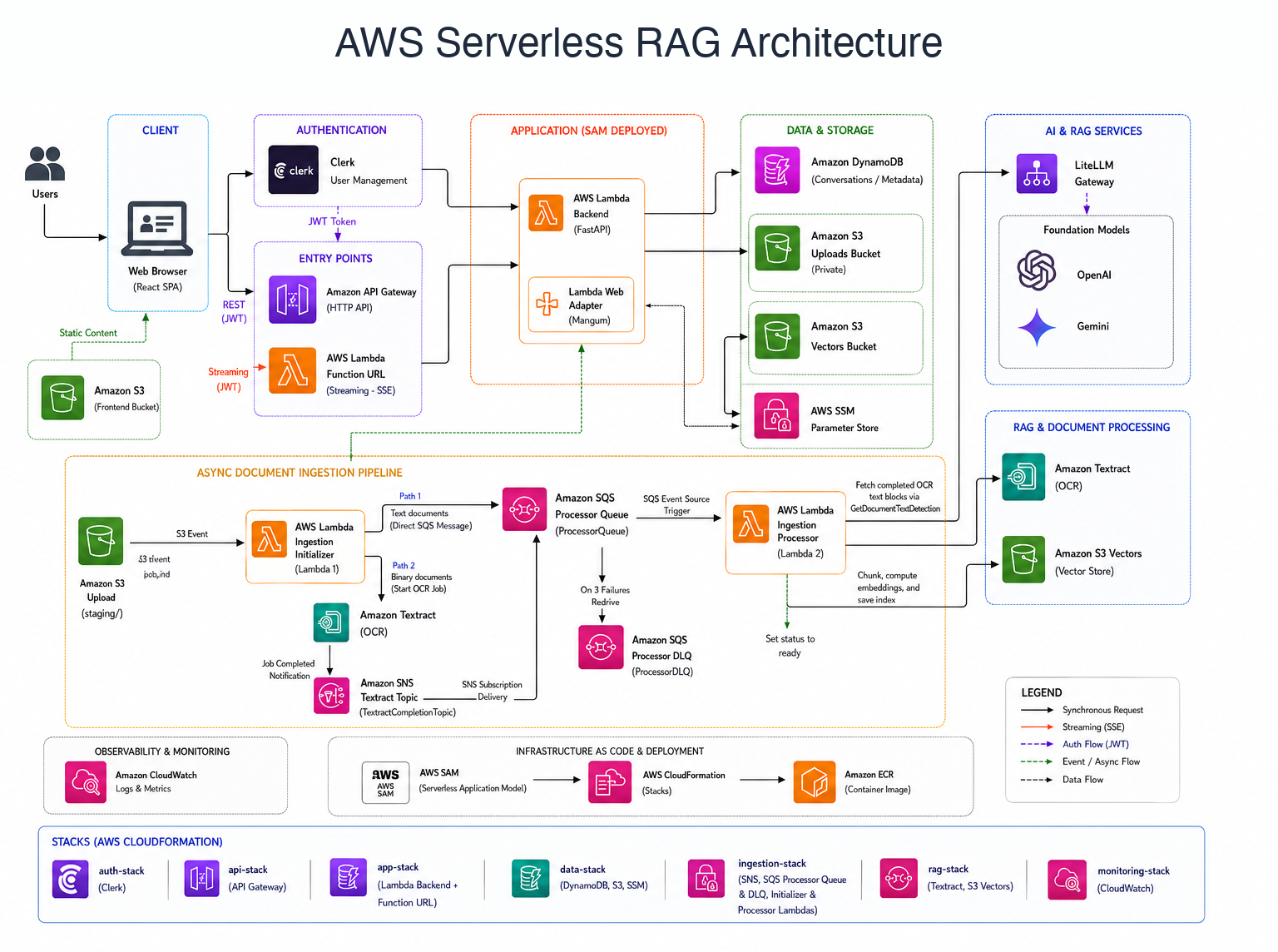
AWS implementation: Vercel frontend, AWS Lambda backend via Function URLs, DynamoDB state, S3 Vectors, and two-stage ingestion with S3, Textract, SQS, SNS, and Lambda.
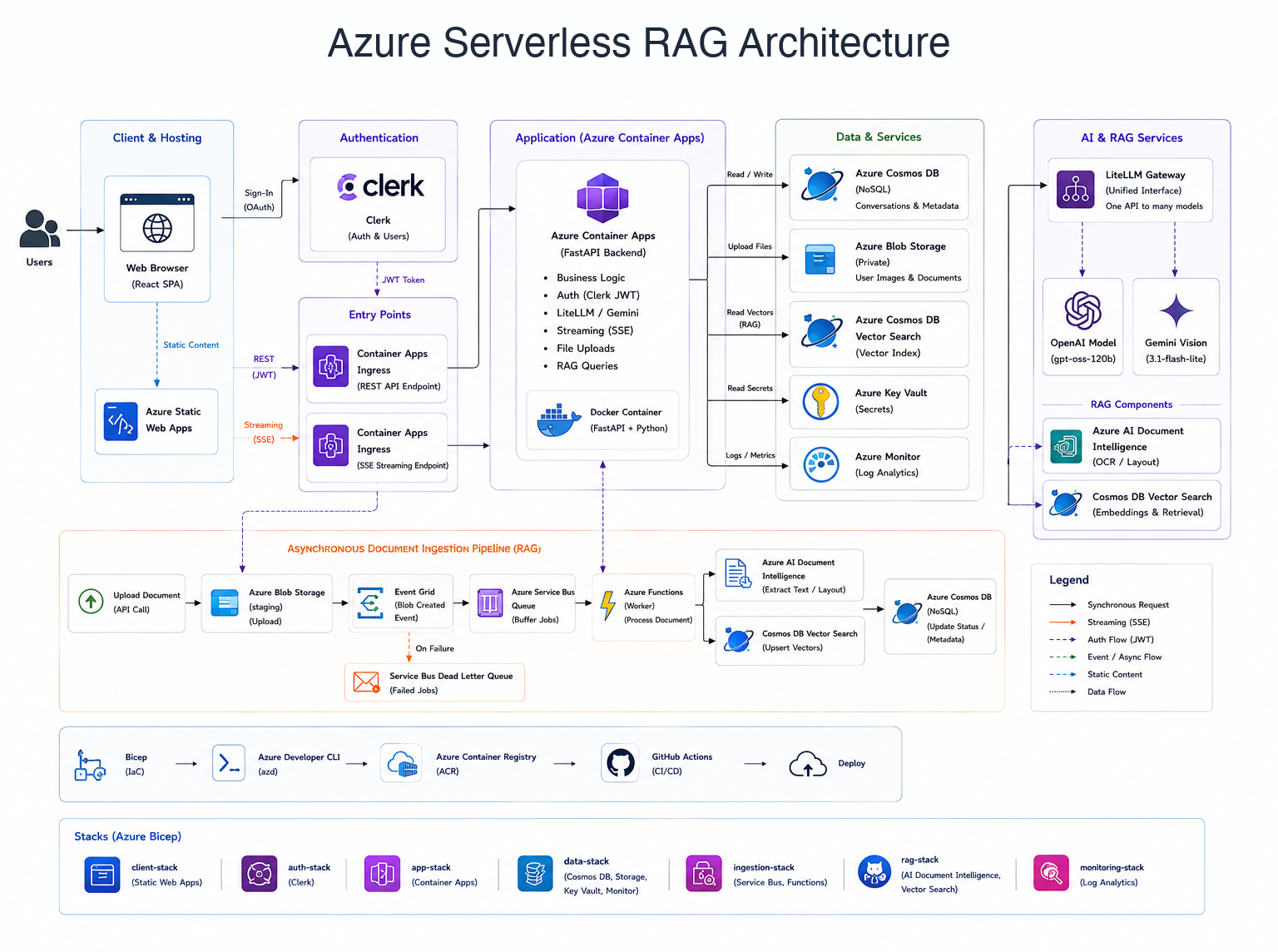
Azure implementation: Static Web Apps frontend, Azure Container Apps backend, Cosmos DB NoSQL vector database, Clerk Auth, and Storage Queue / Azure Functions ingestion.
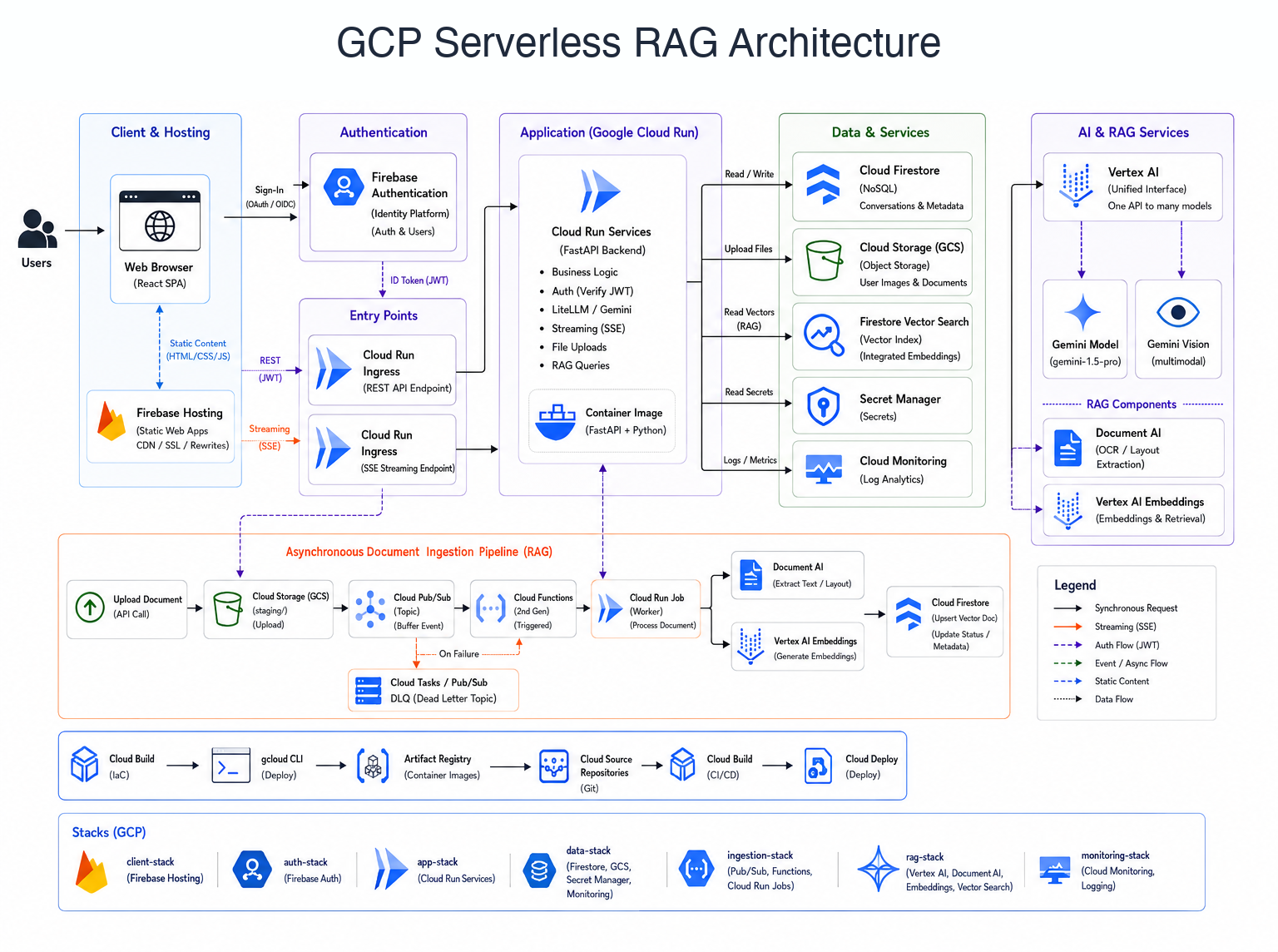
GCP implementation: Firebase Hosting frontend, Google Cloud Run backend, Firestore Native vector storage, Firebase Auth, and GCS / Pub/Sub / Eventarc / Cloud Run ingestion.
Get the Code
The source code, deployment scripts, and IaC templates for all three implementations are open source:
- RAG Chatbot on AWS (Serverless SAM)
- RAG Chatbot on Azure (ACA & Bicep)
- RAG Chatbot on GCP (Cloud Run & Terraform)